.png)

I went through years of the classic “spray and pray.” Find a keyword, write an article, push publish, repeat. That’s what people do. But then I kept noticing something weird. Sites with less authority were outranking me, not just here and there, but everywhere. Whole topic areas, not just single posts. I’d track a handful of tough keywords and there they’d be: always the same sites dominating. I had to know what they were up to. Eventually, I saw it in their site structure.
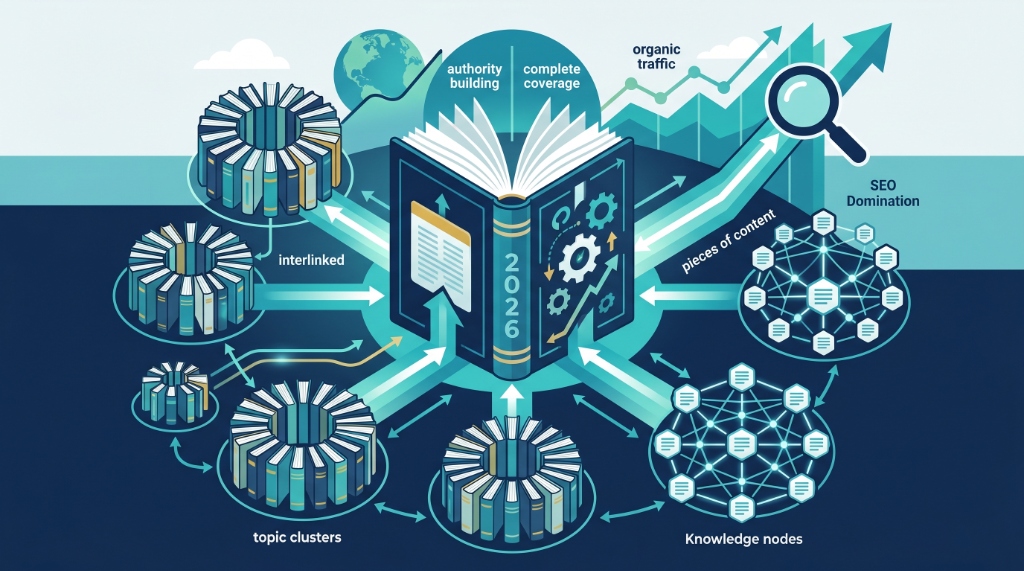
They weren’t just publishing random posts. Their articles lived in a network, carefully linked so every piece pointed back to a single, central resource. Each page helped boost the others, and the big pillar got all the authority. Google treated that pillar like the best answer on the web.
So that’s the pillar cluster content strategy. And after Google’s June 2025 update clobbered disconnected content, it’s not optional. If you want to keep up (or pass your competitors) this is a crucial part of building your brand's content moat to dominate search rankings.
I’ll walk you through everything: what this strategy actually is, what real pillar pages look like, how to build clusters, and the mistakes that blow up months of effort.
🛡️ What Is the Pillar Cluster Content Strategy?
Here’s the gist: you build your site around a central “pillar page” that covers a big topic. That pillar links to a bunch of in-depth cluster articles, each covering a subtopic. Every cluster page links back up to the pillar. The site ends up looking like a hub-and-spoke model: all those branches feeding power back to the trunk.
Picture a tree. The pillar page is the trunk. The cluster articles are branches. The authority travels both ways; branches need the trunk, but the trunk gets stronger with more healthy branches.
Google’s smarter now. One “email marketing” article? Maybe you rank for one keyword. But a pillar page for email marketing, linked to a dozen cluster articles on segmentation, subject lines, automation, A/B testing, deliverability, all that? Suddenly it’s clear your site is an authority for the whole field, not just a random one-off keyword.
Google cares about coverage: do you have the complete picture, not just slices. Their AI doesn’t just look for repetition of keywords. Semantic relevance is the name of the game. The pillar cluster model works because it’s built exactly for that.
🤖 Why the Pillar Cluster Model Beats Old-School Blogging
The old blogging playbook is simple: each post stands alone. You target a keyword, write an article, cross your fingers for some backlinks. But the trouble is, every article is fighting for itself. No compounding. No clear “authority” on the big picture, so Google doesn’t trust your coverage, and your content ends up scattered.
The pillar cluster model fixes three big messes:
- Keyword Cannibalization: With isolated posts, you’re probably writing two versions of the same piece, such as “email marketing tips” and “best email marketing practices,” and they just split your authority. In a cluster, every subtopic gets one home, so nothing gets wasted.
- Internal Link Chaos: Random internal links cause half your posts to have zero links in, while others get hammered. A pillar cluster sets clear roads: each article channels authority back to the main pillar, and every cluster gets support.
- Topical Gaps: Without structure, you’ll write ten articles about the same sub-niche and miss entire topics your audience actually needs. Mapping clusters makes you plan the whole orchard, not just keep planting the same tree.
The impact? It’s measurable. Clustered content gets more organic traffic, bringing about a 30% bump according to industry research in 2025. HubSpot saw a 43% average traffic increase after switching to topic clusters. Rankings last longer too. This is proven stuff.
📄 What Does a Pillar Page Actually Look Like?
A pillar page isn’t just another blog post. It’s your big, meaty, no-stone-unturned guide, usually 2,000 to 5,000 words. It covers the surface of every major angle, then points readers off to cluster articles for any deep dives.
Think of it as an interactive table of contents that’s thorough enough for a beginner, then offers expert-level details via those cluster links.
What’s inside:
- The start: Introduces the topic, explains why it matters, and has a crystal-clear table of contents. (Yes, TOCs help readers and Google alike.)
- Main body: Every key subtopic gets its own section. Each section answers the big question, then points to the detailed guide (the cluster page).
- End: Summarizes, gives practical next steps, and calls to action that match what a reader might do next.
There are three main types of pillar pages:
- Comprehensive Guide: Top to bottom coverage, like Moz’s Beginner’s Guide to SEO.
- Resource Hub: Curated tools, references, and templates. Perfect if your audience needs practical stuff.
- Service/Product Pillar: A big-picture guide tailored to your offer, with clusters answering every pre-purchase question.
🏆 Pillar Page Examples That Get Results
- HubSpot’s Instagram Marketing Pillar: One big page covering everything Instagram marketing, with clusters on stories strategy, ads, business use, hashtags, and engagement tricks. Tons of traffic, tons of links. See how they lay out their strategy in HubSpot's Instagram Guide.
- Backlinko’s Link Building Pillar: Covers all link building, connects to even deeper guides on every specific tactic, such as broken links, skyscraper technique, PR, and so on. Each cluster scoops up its own keywords, and the pillar sits high for the main search. Take a look at Backlinko’s Link Building Guide for a perfect reference.
- Moz’s SEO Learning Center: Whole sections of the site built as clusters. Their keyword research pillar connects to guides on long-tails, difficulty scoring, search volume, and more. This setup has held their SEO authority for years. Visit Moz’s SEO Learning Center to study their layout.
The pattern? Each cluster page is laser-focused and valuable on its own. They all feed the pillar, and the pillar feeds them.
🛠️ How To Build a Pillar Cluster Strategy (Step-by-Step)
Step 1: Pick Your Core Topic
It needs to be wide enough for at least 8 to 20 subtopics, but not so wide it’s just “marketing.” For example: “Email marketing” is great. “Welcome email sequences” is too narrow. If you can easily think of ten distinct articles you’d write underneath, you’ve got your pillar.
Use keyword research platforms like Ahrefs or Semrush to be sure there’s good search volume for both the main pillar and the offshoots. Pillar keyword: 1,000 to 10,000 monthly searches. Clusters: 100 to 2,000.
Step 2: Audit What You Already Have
Don’t start from zero. Dig through your archives. You probably have posts that would make great cluster pages; they’re just buried and unlinked. Some might be competing with each other: pick the strongest and consolidate the rest.
Step 3: Map Your Cluster Topics
Write out every subtopic worth addressing under your pillar. These will be your cluster articles. Each one should have clear search intent, belong directly under the main pillar, and have enough meat for a 1,200+ word guide.
Example for Email Marketing:
- Pillar: Email Marketing 101
- Clusters: list building, segmentation, subject lines, automation, A/B testing, deliverability, design, re-engagement, analytics, mobile optimization, tools, ecommerce strategies.
Every cluster goes deep and links back to the pillar. The pillar links to all clusters.
Step 4: Write the Cluster Pages First
Most people start with the pillar. Wrong order. Write (or fix up) your deep-dive cluster pages first. That way, your pillar can reference each cluster and stay high-level without repeating yourself. Plus, you’ll know exactly what to link to.
Step 5: Build the Pillar Page
Now, build out your pillar. You want at least 2,000 words; 3,000+ is better. Use an H1 with your main keyword. Put a clickable table of contents at the top. Structure H2s by cluster topics.
For every section, give the basics, then link out to the cluster for detail. And don’t just say “read more” - use descriptive links: “See our guide to email segmentation strategies.”
Use logical headings throughout: H1 for the title, H2 for main sections, H3 for anything smaller. This helps Google see your site’s structure.
Step 6: Link Everything (the Right Way)
Every cluster should include a link back to the pillar. The pillar should link to every cluster. This two-way structure forms your hub.
Anchor text matters: no “click here” or “learn more.” Each link says exactly what it goes to, such as “see our complete guide to re-engagement campaigns.”
And don’t force it, but cross-link between clusters when useful. For example, if both segmentation and automation talk about behavioral triggers, link them together (which also optimizes your overall click depth and site pagination). This reduces bounces and raises the authority score all around.
Step 7: Keep it Fresh and Growing
A pillar cluster isn’t a set-and-forget thing. Every quarter, update old stats, add new clusters if there are relevant subtopics, and keep everything accurate. Google rewards freshness, especially on your pillars.
📊 The 5 Mistakes That Sink Most Pillar Cluster Strategies
- Topic is too broad/narrow: “Digital marketing” is way too wide. “How to write a subject line” is too specific. Pick the right size.
- Poor internal links: If you skip bidirectional linking, you might as well just have a bunch of random posts. The links are what makes this work.
- Overlapping cluster pages: Don’t write several articles targeting the same keyword with a slightly different spin; they’ll cannibalize each other.
- Letting the pillar go stale: Outdated info and broken links drain your authority. Schedule regular reviews, especially if your industry changes fast.
- Publishing the pillar before the clusters: A pillar with nowhere to link fails at launch. Publish at least five clusters first, then the pillar; otherwise, you launch a hub with no spokes.
🤖 Pillar Cluster SEO and AI Search (2026 Edition)
Today, pillars and clusters matter for more than just Google. AI-driven search, such as ChatGPT and Perplexity, grabs data based on thorough coverage. When you have clusters and a pillar, you teach those AI systems that your site is the authority, not just a one-off mention.
In 2026, over half of user queries trigger AI search features. If your clusters show search engines and AI models that you cover every corner of a topic, you win citations, rankings, and direct answers in SEO/GEO. The sites building organized clusters now are the ones AI pulls from tomorrow.
📋 Your Next Steps: Start This Week
Time’s ticking. Google’s recent updates just burned a ton of sites with scattered, weak content; lots of people lost up to 95% of their traffic overnight. The ones that built clear topic clusters? Most held steady or climbed.
Don’t get paralyzed. Start one cluster:
- This week: Pick your pillar topic. Write out every subtopic. Audit your blog for cluster material.
- Next two weeks: Publish or update your first three cluster guides, each one better than anything else out there for its little corner.
- Week four: Build your pillar. Connect the dots, fully linking in both directions.
- Keep going: Add two new clusters per month. Update your pillar every quarter.
Honestly, one real cluster will beat a bunch of weak, throwaway blog posts every single time, over 12 months and over five years. That’s just how the math shakes out.
So, the only real question: do you start today, or spend another year wondering why your traffic keeps slipping while someone else becomes the go-to source in your space?