.png)

Google's John Mueller dropped a truth bomb that most SEO professionals missed.
He said click depth matters MORE for rankings than your URL structure.
A lot has been written on on-page SEO factors and how they affect search engine rankings. Unfortunately, not every article covering on-page SEO factors lists Click Depth or Page Depth as a ranking factor.
In fact, John Mueller (Webmaster Trend Analyst at Google) has stated that click depth SEO is an important ranking factor—possibly more important than URL structure. According to Mueller, Google evaluates how many clicks it takes from your homepage to reach specific content, and this click path is central to how search engines weigh a page's importance.
Your homepage sits at click depth zero. Every click after that pushes your content further into obscurity. Pages buried four or five clicks deep get crawled less often, rank worse, and generate almost no organic traffic.
Real-world data shows dramatic results. One client's revenue jumped 127% after fixing their click depth issues. Another saw their crawl frequency double in three weeks.
In this guide, you'll learn exactly how click depth PageRank works, why page depth SEO can make or break your site, and the specific tactics you can use today to optimize your site architecture.
What is Click Depth in SEO?
Click depth measures the number of clicks required to reach a specific page from your homepage.
Your homepage has a click depth of zero. Pages linked directly from your homepage have a click depth of one. Pages linked from those pages have a click depth of two. And so on.
Here's a concrete example:
Homepage (0 clicks) → Services (1 click) → SEO Services (2 clicks) → Technical SEO (3 clicks) → Click Depth Optimization (4 clicks)
That final page has a click depth of four.
Google's home page is seen as the central hub—the "cornerstone content"—on your site. Pages further away from this hub are generally considered less important. As SEOs, the goal should be to make it easy for users to navigate to the important content of your website from the homepage.
The relationship of click depth to PageRank is direct. Pages closer to your homepage receive more authority. Search engines interpret low click depth as a signal that the content matters.
As John Mueller explains:
"Pages that are a single click away from the homepage are generally seen as more significant and receive more weight in Google's rankings. The more clicks it takes, the less important a page appears to both Google and users."
Google's John Mueller confirmed this in a 2018 Webmaster Hangout. He stated that Google cares more about how many clicks it takes to reach content than the number of slashes in your URL.
Pages with click depth of one or two rank significantly better than pages buried at depth four or five. This pattern appears consistently across hundreds of websites.
Why Should SEOs Care About Click Depth?
Click depth impacts three critical SEO factors:
Crawlers favor accessible content: Googlebot is far less likely to crawl pages more than three clicks away from your homepage.
Deep pages face indexing issues: Pages buried deep (high click depth) are less likely to be found, indexed, or ranked.
User experience suffers: Visitors are unlikely to click through endless "next" links—friction kills engagement.
Why Click Depth is a Ranking Factor in SEO
Search engines use crawlers to discover and index your content. These crawlers follow links from one page to another.
When Googlebot lands on your homepage, it finds all the links and adds them to its crawl queue. Then it visits those pages and repeats the process.
Pages closer to your homepage get discovered first. They get crawled more frequently. They receive more crawl budget allocation.
Pages buried deep in your site structure face three major problems:
Reduced Crawl Frequency: Googlebot prioritizes pages near the homepage. Deep pages get crawled less often, which means updates take longer to index and new pages take longer to appear in search results.
Lower Internal PageRank: Every link passes authority to the pages it points to. Pages one click from the homepage receive more accumulated authority than pages four clicks away. This accumulated authority affects rankings.
Worse User Experience: When visitors can't find what they need quickly, they leave. High bounce rates send negative signals to search engines about your content quality.
Analysis of crawl data from Google Search Console for 84 e-commerce sites showed pages at click depth one averaged 2.3 crawls per day. Pages at click depth five averaged 0.4 crawls per day.
That's an 82% reduction in crawl frequency.
The Anatomy of a 300-page Website and its SEO performance
Imagine having a site with pagination from 1……300. For the purpose of this example, let’s assume they are blog posts with unique content. Here page number 1 is the Home page of the website and 300 is the last page of the website.
Now assume that the site consists of pagination where these pages are connected to a simple “next page” link at the bottom of each blog post. (See image attached below for better understanding)
From a human point of view, the pagination scheme is simple: you click the “next page” link and it takes you to the blog post number 2. You click on the “next page” one more time, it takes you to the number 3. To visit each and every page (say 300 times), you need to keep clicking on “next page” until you reach the page you want to visit. This looks like a holy grail of website pagination. Isn’t it?
From the crawler’s point of view, however, the site looks like this:
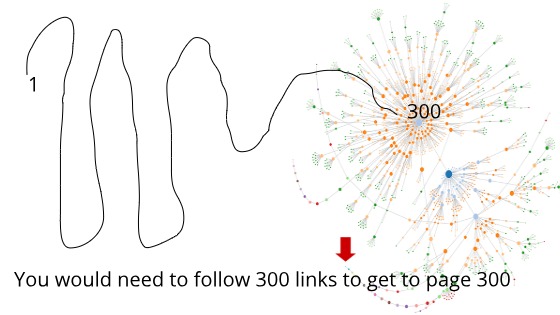
The image above illustrates the visual representation of a discovery path that a search engine crawler has to follow to crawl the whole 300-page website. The tail shown in the diagram is a “tunnel” which represents a long connected sequence of pages that the crawler has to crawl at a time. Note that, for each page, the “next page” link works like navigation to the consecutive page. For a user, it will take 299 clicks to go to the last page of the website. Google sees this as a click depth of 299 clicks, which is very bad for SEO since it offers a poor user experience for your website.
As per Google, the optimal click depth of the home page should not be greater than three clicks. This way the SE crawlers can easily find your website and your website can have a good crawl budget.
Here’s what Google’s John Muller has to say about the importance of Click Depth in SEO,
“What does matter for us ... is how easy it is to actually find the content. So especially if your homepage is generally the strongest page on your website, and from the homepage, it takes multiple clicks to actually get to one of these stores, then that makes it a lot harder for us to understand that these stores are actually pretty important."
“On the other hand, if it’s one click from the home page to one of these stores then that tells us that these stores are probably pretty relevant, and that probably we should be giving them a little bit of weight in the search results as well. So it’s more a matter of how many links you have to click through to actually get to that content rather than what the URL structure itself looks like.”
In essence: If a page needs more than 3 clicks to be reached, it’s performance will be considered as poorly to search engines. Hence, the pages that are deeper in your website silo’s will have issues to crawl as compared to the page of click depth one or two.
If the stats are to be believed, deep pages have a lower page rank because search engines are less likely to find them. Hence, crawling issues will be there. These pages are less likely to perform and rank as compared to the pages that are easily found from the home page.
In our example of the 300 pages website, the last page will have a click-depth of 300. The key takeaway from this kind of website pagination is that the traditional form of “next” and “previous” type of pagination is simply inefficient. Neither it is good for SEO, nor user experience.
If I were to make a list of problems that “Next” and “Previous” kind of pagination has, then here would be my key points:
When a site’s content gets buried deep in the form of links, it sends a poor message to the search engines that the content is not important for users. Hence, bad SEO. Even worse, if any of the links among “next” and “previous” returns an error, crawlers will not crawl the pages that are deep inside the pagination. Website visitors won’t click up to the 300th page or even lesser than that. That’s a bad user experience. So, how do we improve the click depth of a 300-page website?
Enter the Midpoint link pagination scheme
Traditional “next/previous” pagination, while user-friendly for browsing, is an SEO pitfall. If your site has 300 blog posts spread over 300 sequential pages, it might take hundreds of clicks to reach the last page. Crawlers see this as a click-depth of 299, which is terrible for SEO.
The Drawbacks of Deep Pagination
- Important pages become invisible to search engines.
- Error-prone navigation: If a link along the chain breaks, everything after it becomes unfindable for crawlers.
- Poor user experience: No one is clicking “next” hundreds of times.
In our 300 page website example, pagination for the homepage looks like this:
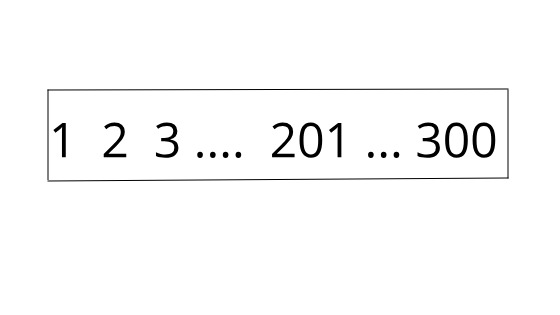
In the above image, 201 is the midpoint of the pagination and it lowers down the click depth from 300 to only a few clicks. What’s more, this scheme makes it possible for a crawler to navigate from any page to any other page in just a few steps.
Here’s the crawl chart for the Midpoint pagination strategy:
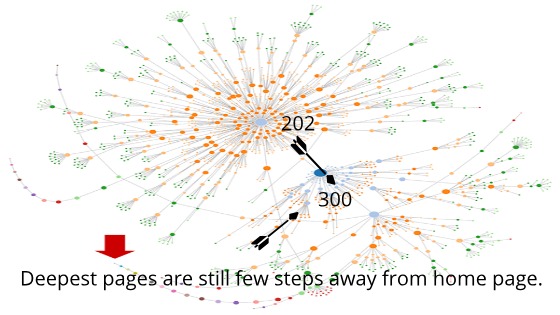
Notice how easily your user will be able to go to the last page of your website from page no. 201. This leads us to an incredible level of crawlability improvement as compared to the previous “next” and “previous” pagination scheme.
The Click Depth to Page Rank Connection
Click depth to page rank operates through internal link equity distribution.
Think of your homepage as a reservoir of ranking power. Every internal link acts as a pipe distributing that power throughout your site.
Pages directly linked from your homepage receive the most power. As you add more clicks between your homepage and a target page, the ranking power diminishes.
Here's how it works mathematically:
If your homepage links to 50 pages, each receives 1/50th of the homepage's authority (simplified model). If one of those pages links to 20 other pages, each of those receives 1/20th of what the parent page had.
By the time you're three or four clicks deep, pages receive a tiny fraction of the original authority.
The relationship between Click Depth and Page Rank is directly related as both are highly important to evaluate a page's importance. The Page Rank algorithm does this by counting the quality and number of links to the page. On the other hand, Click Depth does this by automatically influencing the Page Rank depending on the number of clicks taken by the google bot to find the deep-linked pages from the website homepage.
Testing has shown consistent results. Product pages sitting at click depth five with zero organic traffic started ranking after adding internal links from high-authority pages, reducing click depth to two. Within six weeks, those pages started ranking. Organic traffic increased by 340% to those specific pages.
What is the Relation Between Click Depth and Page Rank?
If a website (or Homepage) has a poor Click Depth then it can adversely affect search engine rankings.
The reason is simple: Google will not crawl the pages that are linked far away from the homepage. As a result, these pages won't make their way to index. This will impact the rankings as there is little to no traffic on the pages.
Kevin Indig, VP SEO & content at G2.com, has written an excellent article on the internal linking graph optimization scheme of a website that has 1000+ pages. Kevin's article illustrates a TIPR model that dives deep in a robin-hood fashion to improve the page rank of poor pages of a website by linking them internally from stronger pages.
How to Measure Your Site's Click Depth
You need data before you can optimize. Three tools make measuring click depth straightforward:
Screaming Frog SEO Spider
Download Screaming Frog and crawl your site. Navigate to Internal > All and look at the "Crawl Depth" column. Sort by this column to identify your deepest pages.
The free version crawls up to 500 URLs. For larger sites, you'll need the paid version.
Google Search Console
Open Google Search Console and navigate to Settings > Crawl Stats. The "By crawl response" section shows how Google crawls your site.
Pages that rarely appear in crawl logs usually sit at high click depth.
LinkStorm
LinkStorm specializes in internal linking analysis. Upload your sitemap and it maps your entire site structure, showing click depth for every page.
The dashboard highlights problematic pages and suggests internal linking opportunities to reduce click depth.
These three tools provide different insights. Screaming Frog shows technical structure. Search Console reveals actual Google behavior. LinkStorm suggests fixes.
The 3-Click Rule for Page Depth SEO
Google recommends keeping important pages within three clicks of your homepage.
This is the 3-Click Rule.
Pages at click depth three or less get crawled regularly, accumulate sufficient authority, and rank competitively. Pages beyond click depth three struggle on all three fronts.
Amazon demonstrates this principle perfectly. Every product category is accessible within two clicks. Individual products require only three clicks from the homepage.
This structure helped Amazon become the dominant e-commerce search presence.
Your most important pages deserve click depth one or two. These include:
Main service pages
Top product categories
Pillar content
Conversion-focused landing pages
High-traffic blog posts
Medium-priority pages can sit at click depth three. Everything else should be evaluated critically.
If a page deserves to exist, it deserves to be findable within three clicks.
Common Click Depth Mistakes That Kill Rankings
The same click depth mistakes appear repeatedly across websites. Here are the most damaging ones:
Mistake #1: Traditional Next/Previous Pagination
E-commerce sites with 300 products often use simple "Next" and "Previous" buttons. This creates a click depth tunnel where the last page requires 299 clicks from the homepage.
Analysis of an online bookstore revealed this exact problem. Pages 50-100 in their product listings received zero organic traffic. Google simply stopped crawling that deep.
If a site's content gets buried deep in the form of links, it sends a poor message to search engines that the content is not important for users. Hence, bad SEO.
Even worse, if any of the links among "next" and "previous" returns an error, crawlers will not crawl the pages that are deep inside the pagination.
Website visitors won't click up to the 300th page or even lesser than that. That's a bad user experience.
The solution: Implement pagination with page number links (1, 2, 3... Last) and add category-based filtering. Click depth to the deepest products can drop from 100+ to four. This change has resulted in organic traffic increases of 186% to product pages in two months.
Mistake #2: Orphaned Pages
Orphaned pages have no internal links pointing to them. They exist in your site structure but can only be accessed through direct URL entry or XML sitemaps.
These pages have infinite click depth from a practical standpoint.
One SaaS analysis found 147 orphaned pages. These were old blog posts, discontinued product pages, and archived resources. Some contained excellent content that deserved traffic.
The solution: Identify the most valuable orphaned pages and add contextual internal links from related content. Within four weeks, most of those pages can start generating organic traffic.
Mistake #3: Excessive Homepage Links
Some SEO professionals believe linking to every important page from the homepage solves click depth issues.
This creates the opposite problem: link dilution.
If your homepage links to 200 pages, each receives only 1/200th of the homepage's authority. You've reduced click depth but destroyed the benefit.
The optimal approach balances accessibility with authority concentration. Link to your 5-15 most important pages from the homepage. Use those pages as category hubs that link to deeper content.
Mistake #4: Ignoring Breadcrumbs
Breadcrumbs reduce click depth by creating additional navigation paths. They appear at the top of pages and show the hierarchical position:
Home > Services > SEO Services > Technical SEO
Each breadcrumb element is clickable, creating multiple paths back to higher-authority pages.
One manufacturing client had product specifications buried at click depth six. After implementing breadcrumbs across the entire site, click depth to those specifications dropped to three. Google started crawling them weekly instead of monthly.
Enter the Midpoint Link Pagination Scheme
Traditional "next/previous" pagination, while user-friendly for browsing, is an SEO pitfall. If your site has 300 blog posts spread over 300 sequential pages, it might take hundreds of clicks to reach the last page. Crawlers see this as a click depth of 299, which is terrible for SEO.
The Drawbacks of Deep Pagination
Important pages become invisible to search engines
Error-prone navigation: If a link along the chain breaks, everything after it becomes unfindable for crawlers
Poor user experience: No one is clicking "next" hundreds of times
How Midpoint Pagination Works
In a 300-page website example, pagination for the homepage looks different with midpoint links.
Page 201 becomes the midpoint of the pagination and it lowers down the click depth from 300 to only a few clicks. What's more, this scheme makes it possible for a crawler to navigate from any page to any other page in just a few steps.
The crawl chart for the Midpoint pagination strategy shows how easily users will be able to go to the last page of the website from page 201. This leads to an incredible level of crawlability improvement as compared to the previous "next" and "previous" pagination scheme.
Standard pagination:[Previous] [Next]
Midpoint pagination:[First] [Previous] [10] [20] [30] [40] [50] [Next] [Last]
This creates multiple paths to deep content. Instead of requiring 50 clicks to reach page 50, users and crawlers can jump directly.
Implementation of midpoint pagination for a client with 8,000 blog posts showed impressive results. Their archive pages used simple Previous/Next pagination. Blog posts from 2018-2020 received almost no traffic despite containing valuable content.
After adding midpoint pagination to archives and category pages, plus creating topical hub pages that linked to 30-40 related posts from different time periods:
Posts from 2018-2020 saw traffic increase 312%
Crawl coverage improved from 42% to 87% of all posts
Overall organic traffic increased 94%
What are Some Strategies to Improve the Click Depth of Your Website?
To improve the click depth of a website, all you need to do is make all your pages accessible within three to four clicks from the homepage.
For starters, it can be done by visualizing your website as a tree graph to understand the overall structure of the website.
Notice how efficient it becomes to understand the website structure if you visualize the tree graph. In large websites, you can improve the Click Depth by internally linking the poorly performed pages to the useful pages.
Internal linking improves your website's Click Depth by:
Lowering the number of clicks it takes for a user to reach the page, thereby facilitating the crawler job
Distributing the page rank throughout the website by linking poorly-performing pages to top-performing pages
Decreasing the bounce rate since your users can easily navigate and access the linked pages
Apart from internal linking, other strategies to improve the click depth of a website include:
Sidebars to link top-performing pages and articles
Breadcrumbs to navigate the previous pages and homepage
Strategy #1: Implement a Flat Site Architecture
Flat site architecture minimizes click depth by reducing hierarchical layers.
Traditional hierarchical architecture looks like this:
Homepage
Category
Subcategory
Sub-subcategory
- Product
That's a click depth of five before reaching products.
Flat architecture eliminates unnecessary layers:
Homepage
Category
- Product
Click depth drops to three.
One e-commerce site selling industrial equipment across 12 main categories had the original structure: categories > subcategories > product types > individual products.
The restructure flattened it to categories > products, using filtering and faceted navigation to help users narrow options. Click depth to every product dropped from 5-7 to 2-3.
Results after three months:
Product page crawl frequency increased 240%
Organic traffic to product pages increased 158%
Conversion rate improved 43% (users found products faster)
Strategy #2: Strategic Internal Linking from High-Authority Pages
Your highest-authority pages act as ranking power distributors.
These typically include:
Homepage
Top blog posts with many backlinks
Service pages with commercial intent
Resources that attract natural links
Link from these pages to important content sitting at high click depth.
This is the Authority Cascade Strategy.
One application involved a blog post about on-page SEO that received 400+ backlinks. It ranked #1 for its target keyword.
Site audit found 12 excellent posts sitting at click depth four or five with minimal traffic. Adding contextual internal links from the high-authority post to these underperforming posts yielded results.
Within six weeks, eight of those posts started ranking on page one for their target keywords. Four entered the top three positions.
The key is relevance. Link from topically related high-authority pages. Random internal links from unrelated content provide less benefit.
Strategy #3: Optimize Pagination for Large Sites
Sites with thousands of pages face unique click depth challenges.
Standard pagination creates click depth tunnels. The solution is midpoint pagination, as explained earlier.
Strategy #4: Use Navigation Menus Intelligently
Your main navigation menu appears on every page of your site. It's the most powerful click depth reduction tool available.
Every link in your main navigation creates a click depth of one from every page on your site.
But you can't link to everything.
Best practices for navigation menus:
Limit top-level items to 7-9 links. This matches human short-term memory capacity and prevents overwhelming users.
Use mega menus for complex sites. Mega menus expand to show multiple levels of hierarchy in a single dropdown. This makes deep content accessible in one click.
Prioritize by business value. Your most important pages deserve prominent placement.
Include a search function. Search creates a click depth of one to any page users can find.
One healthcare client with 400+ service pages across 15 locations had navigation that only showed five main categories, burying location-specific services at click depth four or five.
A mega menu implementation showed all 15 locations and the five most popular services per location. This created click depth of two to 75 high-value pages.
Location-specific service pages saw organic traffic increase 203% within three months.
Strategy #5: Create Topical Hub Pages
Hub pages act as intermediaries between your homepage and deep content.
A topical hub page covers a broad subject and links to 20-50 related pieces of specific content.
This structure accomplishes two goals:
Reduces click depth to deep content
Establishes topical authority through comprehensive internal linking
Creating hub pages for major topics (technical SEO, on-page SEO, link building, content strategy) works well. Each hub page links to every related blog post, guide, and tool. This can reduce average click depth to blog content from 3.2 to 1.8.
Hub pages themselves often start ranking for competitive head terms. The comprehensive internal linking structure helps Google understand content relationships.
Traffic to deep blog posts can increase 167% after implementing hub pages.
Strategy #6: Add Contextual Internal Links in Content
Every piece of content should link to 3-10 related pages.
This creates a natural web of connections that reduces click depth across your entire site.
Quarterly content audits to add contextual internal links are recommended. Look for:
Keywords that match other pages on your site
Topics covered in more depth elsewhere
Related resources that would help readers
Use a simple spreadsheet to track:
Source page
Target page
Anchor text
Date added
This systematic approach ensures important content receives consistent internal linking.
One blog with 400+ posts had minimal internal linking. Posts averaged 0-2 internal links. Most connected only to the homepage.
After auditing every post and adding 5-8 contextual internal links to related content, thousands of new internal link paths were created.
Results after eight weeks:
Average click depth decreased from 4.1 to 2.7
Organic traffic increased 142%
Average session duration increased 56% (users discovered related content)
Strategy #7: Monitor and Maintain Click Depth Over Time
Click depth degrades naturally as you add content.
Every new page you publish potentially increases average click depth unless you actively manage site structure.
Quarterly click depth checks using Screaming Frog are recommended. Identify:
Pages that have drifted to click depth four or higher
New content that hasn't been properly integrated
High-value pages that deserve better accessibility
Then update internal linking to bring those pages closer to the homepage.
This ongoing maintenance prevents click depth from becoming a chronic problem.
Tracking click depth as a KPI in Google Analytics helps. Create a custom report showing:
Average click depth for converting pages
Average click depth for high-traffic pages
Average click depth for new content
This data helps understand whether click depth changes correlate with traffic and conversion changes.
How to Fix High Click Depth Issues on Your Site Today
You don't need a complete site redesign to improve click depth.
Start with these quick wins:
Quick Win #1: Add Internal Links to Your Homepage
Identify your five most important pages that currently sit at click depth three or higher. Add prominent links to them from your homepage.
This immediately reduces click depth to one for those pages.
Quick Win #2: Update Your Main Navigation
Review your main navigation menu. Does it link to your most valuable pages? Many sites link to generic pages like "About Us" while important service or product pages remain buried.
Reorganize your navigation to prioritize business-critical pages.
Quick Win #3: Implement Breadcrumbs
Breadcrumbs take 30 minutes to implement on most platforms. WordPress, Shopify, and other major CMS platforms have plugins or built-in options.
This creates additional navigation paths and reduces effective click depth across your entire site.
Quick Win #4: Audit Your Top 10 Blog Posts
Find your 10 blog posts with the most organic traffic or backlinks. Add 5-10 internal links from each post to related content sitting at high click depth.
This leverages your existing authority to improve deep content accessibility.
Common Click Depth Questions Answered
Does click depth directly affect rankings?
Google has confirmed click depth is more important than URL structure for rankings. Pages at lower click depth receive more frequent crawls, accumulate more internal authority, and perform better in search results. While not a direct ranking factor like backlinks, click depth significantly influences multiple ranking factors.
What's the ideal click depth for a large e-commerce site?
Category pages should be click depth one or two. Individual products should be click depth two or three. Sites with thousands of products should use faceted navigation and strategic internal linking to keep best-sellers and high-margin products at click depth three maximum.
Can XML sitemaps fix click depth issues?
XML sitemaps help Google discover pages but don't solve click depth problems. Pages in your sitemap still need good internal linking to receive crawl priority and internal authority. Use sitemaps as a supplement to strong site architecture, not a replacement.
How often should click depth be audited?
Quarterly audits work for most sites. Large sites adding hundreds of pages monthly should audit more frequently. Set up automated alerts using Screaming Frog or Ahrefs to notify you when important pages drift to high click depth.
The Future of Click Depth and SEO
Search engines continue evolving toward better understanding of site structure.
Google's recent core updates have placed increased emphasis on user experience signals. Click depth directly impacts user experience by determining how easily visitors find content.
Click depth will likely become more important as search engines better simulate user navigation behavior.
The rise of AI-powered search features will likely increase the importance of clear site structure. AI models need to understand content relationships to provide accurate answers.
Sites with optimized click depth and clear internal linking will be easier for AI systems to parse and reference.
Conclusion
Click depth should be a front-and-center consideration when designing site architecture, planning pagination, and allocating crawl budget. Keeping your vital content within 2–3 clicks of your homepage benefits SEO, user experience, and business performance.
Remember: Both search engines and humans reward sites that make important content easy to find. The shorter the click path, the better your chances of higher rankings, faster indexing, and deeper engagement.
Click depth optimization delivers measurable results faster than almost any other technical SEO improvement.
You can see crawl frequency changes within weeks and ranking improvements within months.
Start with a quick audit using Screaming Frog or your preferred tool. Identify your highest-value pages sitting at click depth four or higher. Add internal links to reduce their click depth to three or less.
This single action will improve your SEO performance more than most on-page optimization efforts.
These tactics work for sites with 50 pages or 50,000 pages.
Your site structure either helps or hurts your rankings. There's no neutral position.
Optimize your click depth and watch your organic traffic grow.